My git setup: fish abbreviations, delta and mergiraf
I type git more than anything else in my terminal, so over time I’ve
configured and added a few things which may be worth sharing.
Fish abbreviations with plugin-git⌗
I use fish shell with fisher as the plugin manager. The only git-related plugin is jhillyerd/plugin-git, which ports the oh-my-zsh git aliases to fish:
fisher install jhillyerd/plugin-git
It adds about 180 abbreviations. Unlike aliases, abbreviations expand in place when you hit space, so you still see (and can edit) the full command before running it, and your history contains the real command. A few of them:
| abbr | expands to |
|---|---|
gst | git status |
gss | git status -s |
gcm | git commit -m |
gcb | git checkout -b |
gd | git diff |
gp | git push |
gpra | git pull --rebase --autostash |
gcan! | git commit -v -a --no-edit --amend |
It also ships some functions: gwip/gunwip to park your work in a throwaway
WIP commit and undo it later, gbda to delete all merged branches, and grt to
cd to the repo root.
My own abbreviations⌗
On top of that I have three of my own in ~/.config/fish/config.fish:
# pretty one-line graph log
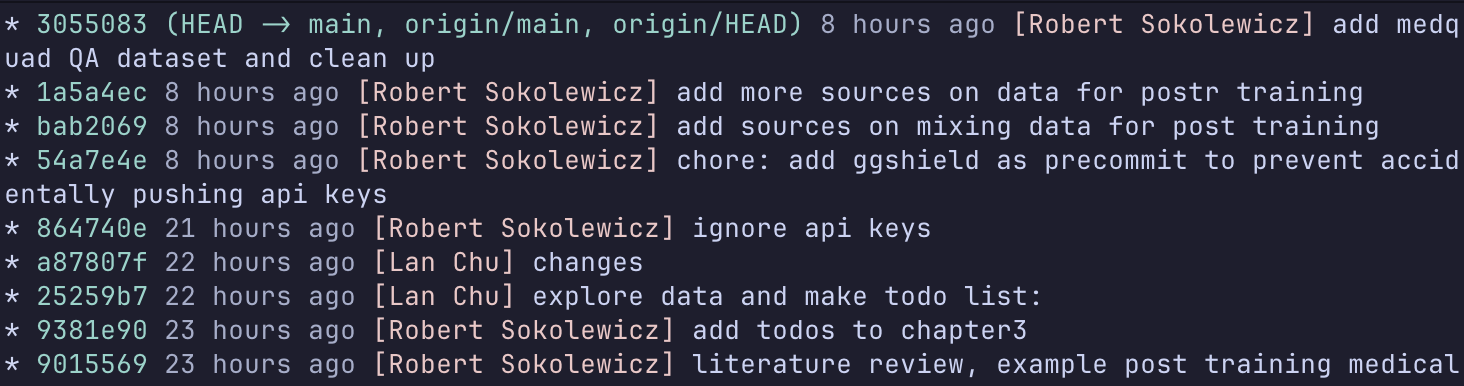
abbr -a glog 'git log --graph --decorate --color --format="%C(auto)%C(#8bd5ca)%h%d %C(#a5adcb)%cr %C(#f0c6c6)[%aN]%C(reset) %C(#cad3f5)%s"'

# pull the latest version of the branch I'm on
abbr -a gsync 'git fetch origin; and git pull --rebase --autostash origin (git branch --show-current)'

# rebase my branch onto the latest main
abbr -a grom 'git fetch origin; and git rebase origin/main'
glog overrides the one from the git plugin, but made it more pretty:
grom is handy right before opening a merge request, so the branch sits on top
of a fresh main. It’s also good to this on the main branch.
and gsync is handy when you apply suggestions on github/github and need to
rebase locally.
delta as the pager⌗
delta replaces the default diff output
with syntax highlighting and line numbers. It’s used for git diff, git show,
git log -p and also the interactive git add -p:
[core]
    pager = delta
[interactive]
    diffFilter = delta --color-only
[delta]
    pager = less --mouse -RF
    navigate = true
    dark = true
    line-numbers = true
    syntax-theme = Dracula
navigate = true lets you jump between files in a diff with n and N, and
--mouse makes scrolling work in the pager.
mergiraf for merge conflicts⌗
mergiraf is a syntax-aware merge driver. Instead of
comparing lines, it parses the file and merges the syntax trees, so two people
adding different functions at the end of the same file, or different imports, no
longer produces a conflict. Setup is two parts. First, register it as a merge
driver in ~/.gitconfig:
[merge "mergiraf"]
    name = mergiraf
    driver = mergiraf merge --git %O %A %B -s %S -x %X -y %Y -p %P -l %L
Then tell git to use it for every file in ~/.config/git/attributes:
* merge=mergiraf
For languages it doesn’t understand it falls back to the normal line-based merge, so there’s no downside to enabling it globally.
Config defaults⌗
The rest of ~/.gitconfig is a few defaults that remove friction:
[pull]
    rebase = true        # never create merge commits on pull
[rebase]
    autoStash = true     # stash uncommitted changes before a rebase, pop them after
[push]
    default = current    # push to a branch with the same name, no --set-upstream needed
[diff]
    tool = code
[difftool "code"]
    cmd = code --wait --diff \"$LOCAL\" \"$REMOTE\"
[alias]